
A great desk audio setup in 2026 is not just about louder speakers or better earbuds. It is about building a workspace that helps you focus, switch modes quickly, and stay productive throughout the day. The best combination often is not speakers or earbuds—it is both.
Best Desk Audio Setup for Focus (Speakers + Earbuds Combo 2026)
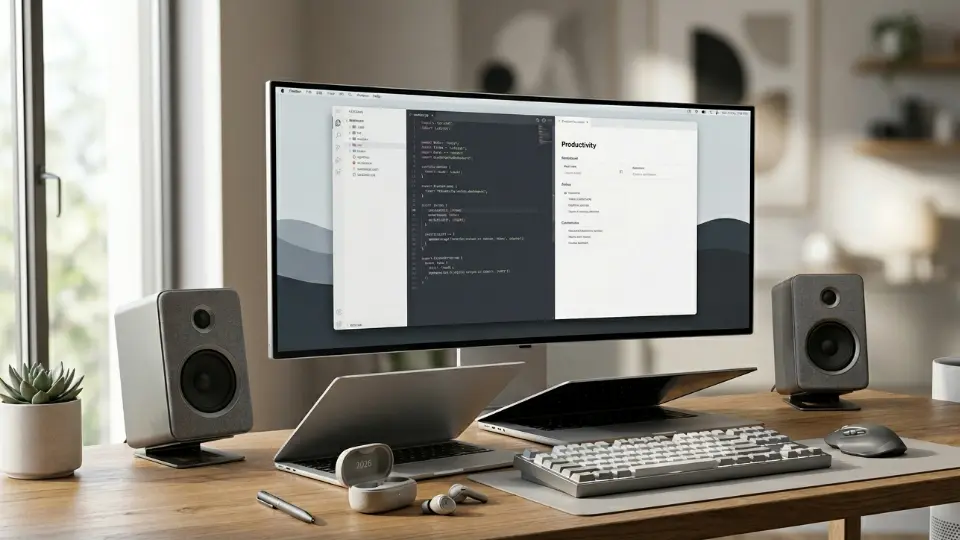
The modern workspace has evolved, and so have our strategies for finding deep, uninterrupted focus. If you are still relying solely on a single pair of headphones for an entire eight-hour workday, you are likely experiencing ear fatigue, audio burnout, or a sense of acoustic isolation that stifles creativity. In 2026, the paradigm has shifted. The ultimate audiophile and productivity hack is no longer finding the perfect all-in-one device; it is building a hybrid system.
Welcome to the ultimate guide on the Speakers + Earbuds Combo—the gold standard for the best work from home setup. By strategically alternating between high-fidelity desktop speakers for ambient, room-filling sound and premium Active Noise Cancelling (ANC) earbuds for laser-focused deep work and crucial meetings, you can hack your productivity and protect your hearing.
In this comprehensive 3000-word guide, we will break down exactly why this dual-audio setup works, how to route your audio seamlessly, and the best hardware pairings available in 2026.
The Psychology of Audio and Deep Work in 2026
Before we dive into the hardware, we must understand why a dual-audio setup is necessary for optimal cognitive performance. The brain reacts differently to different acoustic environments.
The Problem with the “Earbuds Only” Approach
For years, the productivity advice was simple: put on ANC headphones and block out the world. However, chronic use of earbuds leads to several issues:
- Physical Ear Fatigue: Even the best earbuds that don’t hurt after long use will eventually cause physical fatigue in the ear canal if worn for 8 to 10 hours a day.
- Acoustic Claustrophobia: Extended periods of absolute silence (via heavy ANC) can induce a subtle sense of pressure or anxiety in some users, commonly referred to as the “cabin pressure” effect.
- Context Switching: Your brain associates putting on earbuds with specific tasks. If you leave them in all day, that psychological trigger degrades.
The Solution: The Hybrid Audio Workflow
By integrating both speakers and earbuds into your work productivity setup 2026, you create an audio environment that matches your energy levels throughout the day:
- Speakers (The Broad Focus): Best used for answering emails, creative brainstorming, and administrative tasks. Low-volume ambient music, lo-fi beats, or brown noise playing through speakers fills the room, reducing the sterile feeling of a quiet office without demanding your active attention.
- Earbuds (The Deep Focus): Reserved strictly for coding, intensive writing, or important Zoom calls. When the earbuds go in, your brain recognizes it is time to execute complex tasks.
This dynamic approach is a core principle in finding the best tech setup for ADHD focus, allowing users to modulate their sensory input on demand.
Component 1: The Desktop Speakers (The Foundation of Ambient Focus)
Your desk speakers are not just for blasting music; they are tools for environmental control. When selecting desk speakers for productivity, you aren’t necessarily looking for earth-shattering bass (which can be distracting). Instead, you want clarity, a wide soundstage, and excellent performance at low volumes.
Near-Field Monitors vs. Consumer Speakers
For a desk setup, you are sitting in the “near-field” (about 2 to 3 feet from the speakers).
- Studio Monitors: Offer a “flat” sound profile. They play audio exactly as it was recorded. This is excellent for focus because frequencies aren’t artificially boosted to grab your attention.
- Consumer PC Speakers: Often have exaggerated bass and treble (a V-shaped EQ). While fun for movies or gaming, this can be cognitively draining over a workday.
Key Features to Look for in Desk Speakers for 2026
- Multiple Inputs: You want speakers that can connect via USB-C to your PC, but perhaps also have Bluetooth to easily play a podcast from your phone.
- Physical Volume Dial: When the phone rings or a colleague walks in, you need to mute the audio instantly. Fumbling with your mouse to find the Windows volume slider breaks focus. A physical tactile dial is crucial.
- Compact Footprint: Desk real estate is valuable. Your speakers shouldn’t crowd out your best monitors for productivity.
Top Desk Speaker Recommendations for 2026
- The Premium Choice: KEF LSX II LT. These offer unparalleled near-field clarity. They create a holographic soundstage on your desk, making ambient music feel like it’s floating in the room. They are an investment, but for pure auditory focus, they are unmatched.
- The Mid-Range Champion: Audioengine A2+ Wireless. A staple for a reason. They are compact, look stunning on a minimalist desk, and provide warm, non-fatiguing sound that is perfect for all-day listening.
- The Budget Pick: Creative Pebble Pro. If you want to keep costs down while still improving over laptop speakers, these USB-C powered speakers are fantastic.
Component 2: The Earbuds (The Deep Work Isolators)
When the environment gets too loud, or you need to jump into a crucial meeting, you transition to your earbuds. In a Combo Setup, your earbuds serve a very specific, high-intensity purpose.
Crucial Features for the “Combo Setup” Earbud
If you are buying earbuds specifically to pair with desktop speakers, you must prioritize the following:
- Multipoint Connectivity: This is non-negotiable in 2026. Your earbuds must connect to your laptop and your phone simultaneously. When you take them out of the case, they should instantly hijack the audio from your PC speakers. Check out our guide on the best multipoint Bluetooth earbuds in 2026 for deep dives into this tech.
- Top-Tier ANC: Since you are using them to escape noise, the Active Noise Cancellation must be world-class. Understanding what is ANC and how it differs from passive isolation is key to setting expectations.
- Microphone Quality: Because these will be your primary communication device, voice clarity is paramount. Poor mic quality ruins meetings.
- In-Ear Comfort: Even if you aren’t wearing them for 8 hours, you might wear them for a 2-hour deep-work sprint. If you struggle with fit, look into the best earbuds for small ears.
Top Earbud Picks for the Combo Setup (2026)
1. The Ecosystem Kings: Apple AirPods Pro 2 (USB-C) & AirPods 4
If you are using a Mac as your primary workstation, the seamless handoff of the Apple ecosystem is hard to beat. The integration is so tight that switching from Mac speakers to AirPods happens almost telepathically.
- Why they work in the combo: The Transparency mode is still industry-leading. If you need to keep them in while listening to your desk speakers (perhaps waiting for a notification), Transparency mode makes them feel invisible.
- Read our full Apple AirPods Pro 2 USB-C review 2026 and the new Apple AirPods 4 review 2026.
2. The ANC Champions: Bose QuietComfort Ultra Earbuds
If your home office is next to a construction site, or you work in a hybrid bustling open office, Bose is the answer.
- Why they work in the combo: Unrivaled noise suppression. When you need absolute silence, these deliver. They also feature excellent comfort for long stints.
- See how they stack up in our Bose QuietComfort Ultra Earbuds review 2026 ANC Test.
3. The All-Rounder for Windows/Android: Sony WF-1000XM5 (and XM6)
Sony continues to dominate the non-Apple space with incredible sound quality (thanks to the LDAC codec—read our LDAC vs AAC vs SBC guide) and fantastic multipoint switching.
- Why they work in the combo: The customizable EQ in the Sony app allows you to tune them specifically for vocal clarity during calls or deep bass for focus music.
- Compare the titans in our Sony WF-1000XM5 vs Bose QuietComfort Ultra breakdown.
4. The Value Powerhouse: Soundcore Liberty 4 NC
Building a premium desk setup is expensive. If you spent your budget on high-end speakers and a great chair, you can still get 90% of the flagship earbud experience for a fraction of the cost.
- Why they work in the combo: They offer multipoint, surprisingly good ANC, and long battery life. They prove that the gap in budget vs premium earbuds 2026 is rapidly closing.
- Read our Soundcore Liberty 4 NC review.
The Workflow: How to Seamlessly Switch Between Audio Sources
Having great speakers and great earbuds is useless if it takes you three minutes of fiddling with Bluetooth settings to switch between them. The magic of the Combo Setup lies in frictionless transition.
Hardware Audio Routing (The Pro Method)
If your desk speakers are wired to your computer, and your earbuds are connected via Bluetooth, switching should be easy. However, operating systems can be stubborn.
For Mac Users:
MacOS handles audio switching relatively well, especially within the Apple ecosystem. Using an app like ToothFairy allows you to connect/disconnect your Bluetooth earbuds with a single menu bar click or keyboard shortcut, instantly routing audio back to your desktop speakers.
For Windows Users:
Windows 11 has improved, but using a third-party volume mixer like EarTrumpet is highly recommended. It lives in your system tray and allows you to switch audio outputs with two clicks. Better yet, you can route specific apps to specific devices. (e.g., Spotify always plays through your desk speakers, but Microsoft Teams always routes to your headset).
The “Auto-Switch” Strategy
Modern premium earbuds (like the Sennheiser Momentum True Wireless 4 or the Pixel Buds Pro 2) utilize advanced ear-detection sensors.
- 9:00 AM: You sit down at your desk. Your earbuds are in their charging case. Your PC automatically defaults to your desk speakers. You play a low-volume lo-fi playlist while answering emails.
- 10:30 AM: You have a Zoom call. You open the earbud case and put them in your ears.
- The Magic: The earbuds instantly connect via Multipoint. The ear-detection sensor tells the PC you are wearing them. The PC automatically pauses the music on the speakers and routes the Zoom audio to your earbuds.
- 11:00 AM: The call ends. You take the earbuds out and put them in the case. The PC senses the disconnect and automatically resumes your music through the desk speakers.
This zero-friction environment is the ultimate goal of the work from home audio setup 2026.
Scenario Planning: Optimizing Audio for Different Tasks
To truly master the Speakers + Earbuds combo, you need to match your audio output and the type of audio to the specific task you are performing. Here is a breakdown of how to structure your auditory day.
Task Type 1: Administrative & Shallow Work
- Tasks: Email triage, organizing files, updating spreadsheets, casual Slack messaging.
- Hardware: Desktop Speakers.
- Audio Type: Upbeat, familiar music with lyrics, or conversational podcasts.
- Why: Shallow work doesn’t require massive cognitive load. Silence can actually make these tasks feel tedious. Listening to engaging audio through speakers keeps your energy up and prevents boredom, without overwhelming your senses.
Task Type 2: Creative Ideation & Brainstorming
- Tasks: Graphic design, outlining a project, mind-mapping, reading industry news.
- Hardware: Desktop Speakers (Moderate Volume).
- Audio Type: Video game soundtracks, classical music, or ambient electronic (no lyrics).
- Why: You need an open, non-restrictive physical environment to foster creative thinking. Having nothing physically in your ears helps you feel less confined. You can look at our recommendations for the best earbuds for classical music 2026, but for pure ideation, the room-filling sound of speakers is superior.
Task Type 3: The “Deep Work” Sprint
- Tasks: Writing code, writing articles, complex data analysis, financial modeling.
- Hardware: ANC Earbuds.
- Audio Type: Brown noise, binaural beats, or repetitive ambient drone music (like the Hans Zimmer Interstellar soundtrack).
- Why: This is where you need absolute isolation. By turning on ANC and playing continuous, non-intrusive noise, you mask any sudden auditory spikes (a dog barking, a door slamming) that would otherwise shatter your concentration. The physical act of putting the earbuds in acts as a psychological boundary. If you struggle with focus, explore our ultimate guide to noise focus tech 2026.
Task Type 4: Virtual Meetings & Collaboration
- Tasks: Zoom calls, client presentations, remote pair programming.
- Hardware: Earbuds (with Transparency Mode or ANC, depending on your environment).
- Audio Type: Human Voice.
- Why: Desktop speakers can cause echo and feedback loops on calls if you aren’t using a highly directional external microphone. Earbuds guarantee the audio goes straight into your ears, and their built-in beamforming microphones ensure you are heard clearly. Check our list of the best earbuds for calls & zoom meetings 2026 for top performers in this category.
The “Open-Ear” Alternative: A Middle Ground
What if you despise the feeling of silicone tips in your ear canal, but you live in a shared space where blasting desk speakers isn’t an option? 2026 has seen a massive surge in Open-Ear Air Conduction technology.
These devices rest above your ear canal, firing directional sound inward. They offer the physical comfort of speakers (nothing inside your ear) with the privacy of headphones.
Integrating Open-Ear into the Desk Setup
If you are building a combo setup, you could substitute the desktop speakers with a high-quality open-ear headset like the Shokz OpenFit 2 or the Anker Soundcore AeroFit Pro.
- Read our full Shokz OpenFit 2 review 2026 and the Anker Soundcore AeroFit Pro review.
- Default State: Wearing Open-Ear headphones. You have total spatial awareness of your room, zero ear fatigue, and private audio for podcasts or meetings.
- Focus State: Switch to traditional ANC In-Ear buds when the lawnmower starts outside.
For a deeper dive into this technology, read Bone Conduction vs Open-Ear Air Conduction 2026 and Open-Ear vs In-Ear Earbuds: Which is Better in 2026?
Beyond Audio: Completing the 2026 Focus Environment
While a flawless audio setup is arguably the most critical component for maintaining a flow state, it does not exist in a vacuum. Your physical environment deeply impacts how well your audio gear functions and how long you can comfortably sit at your desk.
To truly optimize your workspace, consider the peripheral elements that support your Speakers + Earbuds combo:
1. Ergonomic Foundations
You can have the best audio in the world, but if your lower back is in agony, your focus will break. Investing in one of the best office chairs for long hours is just as important as investing in a high-end DAC or premium speakers. Similarly, navigating your audio switching software requires precision; the Logitech MX Master 3S remains the undisputed king of productivity mice for this exact reason (see how it compares in our MX Master 3S vs MX Anywhere 3 breakdown).
2. Environmental Air Quality
A lesser-known productivity killer is high CO2 levels and poor air quality in a closed home office, which leads to brain fog and lethargy. If you are keeping your door closed to utilize your desk speakers without bothering your family, you need air circulation. Adding a quiet purifier from our best air purifiers for small rooms list ensures your brain gets the oxygen it needs. (Note: A good air purifier provides excellent analog “white noise” that blends beautifully with the ambient music from your speakers!)
3. Acoustic Room Treatment
If you are heavily relying on desktop speakers, the physical room becomes part of your audio setup. Hardwood floors and bare walls create acoustic reflections (echoes) that muddy the sound of your speakers and degrade your microphone quality on calls.
- The Fix: You don’t need an ugly foam-covered studio. A thick rug, canvas artwork on the walls, and some heavy curtains are often enough passive acoustic treatment to tighten up the sound of your desk speakers.
Common Mistakes to Avoid When Building Your Setup
Even with the best gear, users often make configuration errors that ruin the hybrid experience. Here are the pitfalls to avoid:
- Buying the Wrong Earbuds for PC: Not all earbuds play nice with Windows. If you use a PC, ensure your earbuds support multipoint natively and have a strong Windows app (or a good web interface). Some Apple-centric buds struggle with Windows Bluetooth drivers. If you are on an Android/PC setup, consider the Samsung Galaxy Buds 3 Pro or check our list of the best earbuds for Android 2026.
- Forgetting to Manage Microphones: When you switch from speakers to earbuds for a call, Zoom/Teams might not automatically switch your microphone input. Always pin your audio settings to your taskbar to ensure you aren’t listening through your premium earbuds while speaking into a terrible laptop microphone.
- Ignoring Battery Health: If you keep your earbuds in your ears all day, but only play audio through them 10% of the time, you are needlessly degrading the battery chemistry. Use your speakers! Save the earbuds for when you actually need them. Read more about protecting your investment in our earbuds battery life comparison 2026.
- Chasing Specs Over Comfort: You might buy the earbuds with the absolute best ANC rating on RTINGS, but if they cause pain in your concha after 30 minutes, they are useless for deep work. Comfort is king. Read our guide on how to choose wireless earbuds in 2026 to understand fit and form factor.
The Verdict: Crafting Your Perfect Audio Ecosystem
The era of the “one-size-fits-all” headphone is over. The modern professional requires an agile, adaptable environment. By adopting the Speakers + Earbuds Combo Setup, you are not just buying gadgets; you are designing a cognitive workspace.
You are creating a system where low-stakes tasks are accompanied by the expansive, breathable audio of desktop speakers, while high-stakes deep work is protected by the impenetrable acoustic shield of ANC earbuds.
Start by assessing what you already have. If you own a great pair of earbuds like the Jabra Elite 10 Gen 2 or the OnePlus Buds Pro 3, your next logical upgrade isn’t another pair of headphones—it is a solid set of desktop speakers to relieve your ears. Conversely, if you have great desk audio but struggle with noisy neighbors, it is time to invest in premium isolation.
Curate your soundscape, master the frictionless switch, and watch your productivity soar.
Ready to upgrade your workflow? Explore our Tech Product Comparisons hub for side-by-side breakdowns of all the gear mentioned in this article, or dive into our Best Picks Smart Tech 2026 for comprehensive buying guides.