
Your earbuds probably are not “wearing out” evenly. When one earbud sounds louder than the other, the cause is usually simple: wax on the mesh, a bad ear tip seal, a left-right balance setting, ANC microphone blockage, or a partial Bluetooth glitch. The good news is that this is one of the most fixable earbud problems — and in most cases, you do not need to buy a new pair.
Why One Earbud Is Always Louder Than the Other (And How to Fix It)
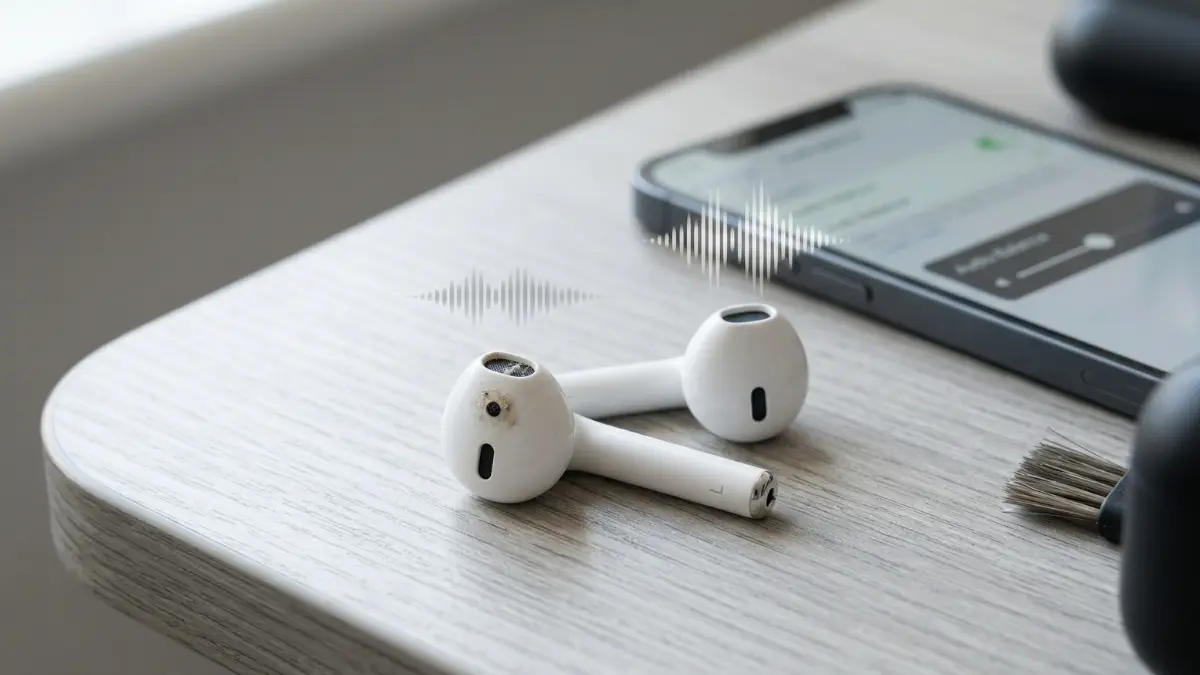
A full step-by-step fix for uneven earbud volume — including cleaning, fit tests, balance settings, ANC issues, firmware bugs, and the exact moment you should stop troubleshooting and replace them.
Why One Earbud Sounds Louder Than the Other
When people notice a volume difference between left and right earbuds, they often assume the quieter side is “dying.” That is possible, but it is not the most likely explanation. In real use, uneven earbud volume usually comes from airflow or signal problems rather than total hardware failure.
The most common cause is simple blockage. A tiny layer of earwax or skin oil on the speaker mesh changes how sound exits the nozzle. High frequencies disappear first, then the whole earbud starts sounding muffled, weaker, or farther away. This can happen gradually, which is why many users do not notice it until the imbalance becomes obvious.
The second major cause is fit. If one ear tip seals better than the other, one side will sound fuller, louder, and more bass-heavy even when the actual driver output is identical. This is especially common with true wireless earbuds because ear canals are rarely symmetrical. If you have ever wondered why earbuds can sound worse over time even when nothing seems broken, this is often the same chain of problems that begins with poor sealing or debris on the mesh.
Then there are software causes: left-right balance settings, mono audio toggles, ear detection errors, ANC calibration bugs, firmware glitches, and incomplete pairing resets. These can all create the impression that one earbud is weaker, even when the hardware is fine.
They compare the sound for two seconds, assume the earbud is broken, and skip the cleaning and fit check. In reality, the majority of one-side-louder problems come from blockage, seal differences, or settings — not driver failure.
The 60-Second Test to Find the Real Cause
Before changing settings or doing a factory reset, do one quick diagnostic test. Put the left earbud in your right ear and the right earbud in your left ear. Then replay the same audio at the same volume.
If the quiet side follows the earbud, the earbud is the problem. If the quiet side stays in the same ear, the issue is probably your ear canal, temporary ear pressure, or hearing imbalance rather than the earbud itself.
Next, test the earbuds on a second device. If the problem disappears, the issue is likely a software setting on the original phone, tablet, or laptop. If the problem remains, continue with the hardware and cleaning steps below.
Step 1: Swap Ears
Move each earbud to the opposite ear. This tells you whether the issue follows the earbud or stays with your ear.
Step 2: Try Another Device
Test the same earbuds on a second phone or laptop to rule out balance settings or app-level audio bugs.
Step 3: Turn Off ANC and EQ
Disable ANC, transparency, spatial audio, EQ, and hearing enhancements. This removes processing variables fast.
Step 4: Compare Spoken Audio
Use a voice recording or podcast instead of music. Speech makes left-right imbalance easier to hear than bass-heavy tracks.
Fix #1: Clean the Mesh and Microphones
This is the first fix because it solves the problem more often than any other. Even if the mesh looks clean at a glance, oils and fine debris can still partially block it. The quieter earbud often has less treble, less clarity, and less punch because the sound is literally being filtered before it reaches your ear.
Remove the ear tips and inspect the nozzle under bright light. If you see wax, dust, or a shiny film, clean it carefully. Use a dry soft brush, a microfiber cloth, or a cotton swab only on the outer surface. Do not push debris deeper into the nozzle. Do not use excessive liquid. Do not use sharp tools.
Also clean the microphones if your earbuds use ANC or transparency mode. A blocked microphone can cause strange channel imbalance when processing is active. If one earbud gets quieter only when ANC is turned on, microphone blockage is high on the list of likely causes.
Safe Cleaning Moves
- Remove ear tips before cleaning
- Use a dry, soft brush on the mesh
- Wipe the outer shell with microfiber
- Clean the ear tips separately
- Let everything dry fully before use
- Check both speaker mesh and microphones
What Not to Do
- Do not pour liquid into the nozzle
- Do not use metal pins or needles
- Do not press wax deeper through the mesh
- Do not scrub coated filters aggressively
- Do not reassemble while damp
- Do not assume “looks clean” means clean
If your earbuds keep sounding muffled after use, it is worth reading your broader cleaning and wear habits too. In many cases, the same buildup that makes earbuds quieter also makes them sound worse over time.
Fix #2: Check Ear Tip Fit and Seal
One earbud can sound louder simply because it is sealing better. A complete seal increases bass, stabilizes the sound, and blocks outside noise. A weak seal makes that side sound quieter, thinner, and more distant. This is why many people think one earbud is broken when the real problem is that one tip size is wrong.
Do not assume both ears need the same tip size. Many people get better balance with a medium tip on one side and a small or large tip on the other. If your earbuds include a fit test in the companion app, run it. If not, listen to a spoken voice track and gently press the quieter earbud deeper. If the sound suddenly becomes fuller and louder, the seal is the problem.
Foam tips can also help. They expand to the shape of your ear canal and often create a more even seal than silicone. That makes them especially useful for users who struggle with one side always sounding off.
Play a podcast, then gently twist or press the quieter earbud. If the voice becomes fuller or louder, you do not have a driver problem yet — you have a fit problem.
Fix #3: Check Balance, Mono, and Accessibility Settings
Phone and computer settings can shift left-right balance without making it obvious. This is especially common after accessibility settings, hearing assistance features, or third-party audio apps have been enabled. A tiny balance shift is enough to make one earbud seem consistently louder across every app.
Check the audio balance slider on your phone, tablet, or laptop. Make sure it is centered. Then check whether mono audio is enabled. Mono itself does not cause one earbud to be louder, but it can make troubleshooting harder and mask the real issue when combined with other audio processing features.
You should also disable custom EQ, hearing accommodations, spatial audio, adaptive sound features, and any app-level sound boosters while testing. The goal is to return the earbuds to a neutral, default playback state.
| Setting to Check | What It Can Cause | Priority |
|---|---|---|
| Left-right audio balance | One side sounds louder across all apps and tracks | Check first |
| Mono audio | Can hide channel issues and complicate testing | Check |
| EQ or bass boost | Can exaggerate fit differences between left and right | Check |
| Hearing accommodations | May shift output or tone to one side | High |
| Spatial audio / adaptive sound | Can create inconsistent channel perception | Medium |
| App-specific sound effects | Problem appears only in one app, not system-wide | Last |
Fix #4: Reset Pairing and Firmware Problems
True wireless earbuds depend on constant synchronization between the left and right sides. If that link gets unstable, one bud can sound weaker, delayed, or processed differently. This does not always sound like a dramatic Bluetooth dropout. Sometimes it simply sounds like one side lost body or output.
Start by disconnecting the earbuds from all known devices. Put both earbuds back in the case, let them charge for a few minutes, and reconnect them fresh. If the problem continues, do a full factory reset using the brand’s recommended procedure. Then update the firmware if an update is available.
Firmware bugs are especially likely when the imbalance appears suddenly after an update, or when the issue only happens in ANC, transparency, or spatial modes. A reset clears stale pairing data and forces both earbuds to rebuild their connection state from scratch.
If cleaning and fit do not solve it, a factory reset is the next highest-value move. It can fix channel desync, ear detection bugs, ANC imbalance, and corrupted pairing behavior in one step.
Fix #5: Diagnose ANC and Transparency Problems
Some earbuds sound balanced in normal playback but become uneven the moment ANC or transparency mode turns on. That usually means the issue is not the main speaker driver. It points instead to a microphone, software calibration, or environmental processing problem.
Test the earbuds in four modes: normal playback with ANC off, ANC on, transparency on, and one-earbud-only mode if your model supports it. If the quieter side appears only in one of those modes, you have narrowed the issue down fast. Clean the external microphones, turn adaptive audio features off, reset the earbuds, and test again.
If you are comparing different noise management approaches, this is also why users sometimes confuse ANC problems with passive isolation problems. The earbuds may not be physically quieter on one side at all — they may simply be processing outside sound differently.
Signs It Is an ANC Issue
- Sounds normal with ANC off
- Gets worse in transparency mode
- One side feels “vacuum-like” or strange
- Microphones look dirty or blocked
- Problem started after a firmware update
Signs It Is Not ANC
- Same imbalance in every listening mode
- Problem follows the earbud in either ear
- Mesh is visibly blocked
- Seal changes fix the volume instantly
- The quiet earbud also charges strangely
Fix #6: Rule Out Battery and Charging Issues
One earbud may sound weaker because it is not reaching full charge, or because the battery on that side is aging faster. On some models, unstable power does not just reduce runtime. It can affect processing consistency, ANC behavior, and connection stability too.
Clean the case contacts and the charging contacts on the earbuds. Then fully recharge both sides and compare battery percentages in the app if your model shows them. If one earbud repeatedly charges lower than the other, or drains much faster, that is an important clue.
A charging issue is especially likely if the quieter earbud also disconnects first, fails to wake reliably, or sometimes shows as “not connected” when you open the case. At that point, the problem may not be acoustic at all — it may be electrical.
If one side is inconsistent, drains faster, or sometimes fails to connect, you may be looking at a charging-contact or battery issue rather than a speaker issue. Clean the contacts and compare battery behavior before assuming the driver is damaged.
When It Is Time to Replace the Earbuds
If you have cleaned the mesh and microphones, tested different ear tips, checked audio balance, reset the earbuds, updated firmware, tested on another device, and fully charged both sides — and one earbud is still clearly quieter — then the remaining explanation is usually internal damage.
The speaker driver may be weakening. The internal acoustic filter may be damaged. Moisture may have reached components that no longer behave consistently. At that stage, DIY fixes become low-probability and high-risk.
The replacement decision depends on price tier. If the earbuds were inexpensive, replacement is usually smarter than repair. If they are premium models still under warranty, contact the manufacturer before opening anything. And if uneven volume has become a recurring frustration for your pair, it may be worth moving to a model with easier cleaning access, better fit options, or more reliable long-term wear behavior.
| Symptom | Most Likely Cause | Best Move |
|---|---|---|
| Quiet side sounds muffled | Wax or debris on the mesh | Clean thoroughly |
| Quiet side changes with ear tip pressure | Poor seal or wrong tip size | Refit or swap tips |
| Problem only on one device | Balance or processing setting | Reset settings |
| Problem only with ANC on | Microphone blockage or ANC bug | Clean + reset |
| Quiet side also drains faster | Charging or battery issue | Check contacts |
| Nothing fixes it | Internal driver or filter damage | Replace or warranty claim |
Final Verdict
In most cases, one earbud is not louder because the other one is “failing.” It is louder because something is interfering with output: wax on the mesh, a poor seal, a left-right balance setting, ANC microphone blockage, or a pairing glitch.
The smartest repair order is simple: swap ears, clean both sides, change ear tips, check balance settings, reset the earbuds, then test ANC and battery behavior. That sequence solves the problem far more often than replacing the earbuds immediately.
If the quiet side still sounds weaker after all of that, especially across multiple devices and with all processing disabled, the problem is probably internal hardware damage. At that point, stop troubleshooting and move to warranty support or replacement.
For readers comparing long-term comfort and durability between different earbud designs, it also helps to understand how fit, passive isolation, and wear habits affect sound over time. Those factors are often connected to the same imbalance problem that starts with one earbud seeming quieter than the other.
Frequently Asked Questions
The usual causes are earwax on the mesh, poor tip seal, shifted balance settings, mono or hearing accessibility settings, ANC microphone blockage, or a pairing glitch. Sudden imbalance does not automatically mean the quieter earbud is dying.
Yes. It is the most common cause by far. A thin layer over the speaker mesh cuts clarity and perceived loudness quickly, especially in the treble range, which makes that side seem weaker even when the driver is fine.
Swap the earbuds between ears. If the quiet side follows the earbud, the earbud is the issue. If the quiet side stays in the same ear, the cause may be earwax in your ear canal, ear pressure, or a hearing difference between ears.
Yes, but only after checking for blockage, bad fit, and balance settings. A factory reset is most useful when the issue comes from pairing desync, firmware instability, or ANC processing errors.
That usually means the microphones or processing are the problem, not the main speaker. Clean the microphones, disable adaptive audio features, reset the earbuds, and update the firmware if your brand offers updates.
If one side is still quieter after cleaning, changing tips, checking settings, resetting, charging fully, and testing on multiple devices, the remaining cause is usually internal damage. That is the point where replacement or a warranty claim makes more sense than more troubleshooting.